

- Rentals
- Apple Rentals
- Apple Mac Studio M5 Max & M5 Ultra
Apple Mac Studio M5 Max & M5 Ultra
The Apple Mac Studio M5 Max or M5 Ultra delivers exceptional performance for demanding creative, technical and AI workloads—all from a compact desktop that fits neatly into studios, production environments and temporary workspaces.
The M5 Max is an excellent choice for professional video editing, photography, software development, music production and real-time 3D work. For more intensive requirements, the M5 Ultra provides substantially greater processing power, graphics performance and unified memory—making it suitable for complex visual effects, 8K post-production, large-scale rendering, data science and running AI models locally.
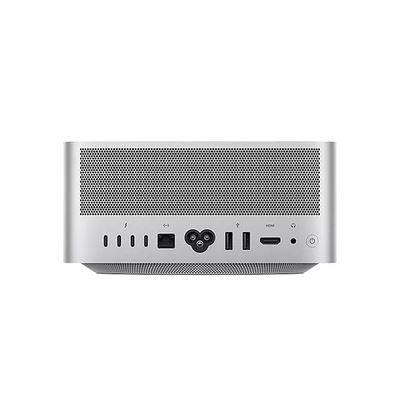
With Thunderbolt 5, 10Gb Ethernet, HDMI 2.1 and support for multiple high-resolution displays, the Mac Studio can be built into a complete professional workstation. Pair it with an Apple Studio Display, ASUS ProArt 4K Monitor or additional Apple Mac rental equipment to create the right setup for your project.
Hiring gives your team access to Apple’s highest-performance desktop without committing to a permanent purchase. Hire Intelligence can supply equipment for short-term projects, production work, temporary studios and longer deployments, with delivery and installation support available.
For help choosing between models, see our Mac Studio vs iMac comparison, or speak to our team about the applications and workflows you need to run.
Deploy 1 – 1000 critical devices.
Whatever hardware your organisation needs, we have the stock, expertise, and network to enhance your event or power your projects.
Get a Quote-
 Pre-configured devices, tailored for enterprise clients
 -
 Flexible payment, delivery and installation options
 -
 Account management: from concept to completion
 -
 Tech support: ‘working day’ device-swap promise
Technical Specifications
- Processor Apple M5 Max with an 18-core CPU, or M5 Ultra with up to a 36-core CPU
- Graphics Up to a 40-core GPU with M5 Max or an 80-core GPU with M5 Ultra
- Neural Engine 16-core with M5 Max or 32-core with M5 Ultra, with Neural Accelerators built into the GPU
- Unified Memory From 36GB on M5 Max or 96GB on M5 Ultra; configurable up to 128GB or 512GB respectively
- Storage SSD storage from 512GB; configurable up to 8TB with M5 Max or 16TB with M5 Ultra
- Display Support Up to five external displays with M5 Max or eight with M5 Ultra
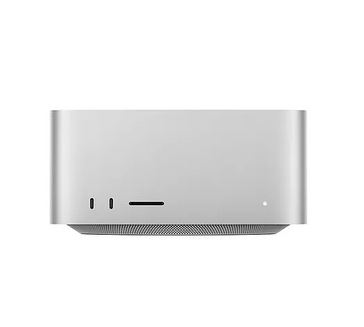
- Connections Thunderbolt 5, USB-A, HDMI 2.1, SDXC card slot, 10Gb Ethernet and 3.5mm headphone jack
- Wireless Connectivity Wi-Fi 7 and Bluetooth 6
- Media Engine Hardware acceleration for H.264, HEVC, ProRes and ProRes RAW, plus AV1 decoding
- Dimensions 19.7 × 19.7 × 9.5cm; approximately 2.7kg for M5 Max or 3.6kg for M5 Ultra
Frequently Asked Questions Apple Mac Studio M5 Max & M5 Ultra
-
What is the difference between the M5 Max and M5 Ultra Mac Studio?
The M5 Max is designed for demanding professional work such as video editing, software development, music production and 3D design. The M5 Ultra offers considerably more CPU, GPU and memory capacity for extreme workflows such as 8K post-production, complex VFX, large AI models and advanced data processing.
-
Does the Mac Studio include a monitor?
No. Mac Studio is a desktop computer and requires a separate monitor, keyboard and mouse. Hire Intelligence can provide compatible equipment, including the Apple Studio Display and professional 4K monitors.
-
Can the Mac Studio run AI models locally?
Yes. Both versions are designed for on-device AI workloads. The M5 Ultra can be configured with up to 512GB of unified memory, enabling it to handle substantially larger models locally.
-
Is the Mac Studio suitable for video editing?
Yes. Its dedicated media engines accelerate H.264, HEVC, ProRes and ProRes RAW workflows. The M5 Ultra is particularly well suited to demanding multi-stream and uncompressed 8K production work.
-
How many monitors can be connected?
The M5 Max supports up to five external displays, while the M5 Ultra supports as many as eight, depending on the resolutions and connection arrangement.
-
Can software be installed before delivery?
Software installation may be available depending on the application, licensing requirements and rental configuration. Customers should discuss their required software and workflow with the Hire Intelligence team when requesting a quote.
Solutions this product is used for
-
 3D Animation & Post-Production Equipment Rental The cost of the latest 3D animation equipment and post-production equipment for companies requiring powerful / state-of-the-art hardware can be pro... View Specifications
 -
 Film Production Equipment & Props Film and TV Production Equipment, and themed props can be costly to purchase. Prop Hire and Technology equipment Hire allows you to trial different... View Specifications
 -
 Renting versus Buying: Capital, Cashflow & Budget Benefits
What are the advantages of renting equipment from a financial viewpoint?
There are several advantages of leasing or renting equipment:...
View Specifications