
Equipping a remote or hybrid team is rarely defined by the hardware alone. Device Performance matters, but it does not determine whether a rollout runs smoothly.
What tends to shape the outcome is what happens before the equipment reaches the end user. This is where IT equipment rental for remote teams becomes less about sourcing devices and more about delivering a working setup.
If systems arrive unprepared or vary across a team, friction appears early. Onboarding slows, avoidable support requests increase, and internal teams are pulled into resolving issues that should have been handled in advance.
Planning and delivery need to be considered together. Setups must be aligned to your environment before dispatch and coordinated so each user can begin work without delay. As teams scale across locations, this level of preparation becomes increasingly important.
Key takeaways
- IT equipment rental for remote teams is not just about devices; it is about delivering fully prepared, user-ready systems across multiple locations.
- For remote deployments, preparation before delivery, including configuration, access and security, has a direct impact on onboarding speed and user experience.
- Most issues in remote rollouts arise from inconsistent setup, poor coordination or lack of support, rather than the hardware itself.
- A structured approach, covering preparation, delivery, support and collection, reduces complexity and improves reliability across the full lifecycle.
- Choosing the right provider depends on how well they manage deployment, not just the equipment they supply. Consistency and responsiveness are key indicators.
- For remote teams, renting is often more practical than buying when deployments need to be fast, scalable and managed across multiple locations.
What is IT equipment rental for remote teams?
IT equipment rental for remote teams is the provision of business-ready technology, delivered to individual users so they can operate effectively from day one, regardless of location.
In practice, this extends beyond supplying hardware.
Each unit is configured before dispatch, with the required software, access settings and security controls already in place. This ensures users are working within a standardised environment, without the need for additional setup or intervention.
Equipment is then deployed across multiple locations, including home offices, regional sites and temporary project environments. Clear allocation and tracking maintain visibility throughout the rollout, supporting both IT and procurement teams.
Unlike traditional IT procurement, where devices are purchased and configured internally, this approach shifts preparation and coordination earlier in the process.
The objective is not simply to supply equipment, but to ensure everything fits into your organisation in a structured and reliable way, supporting day-to-day operations without unnecessary disruption.
Why do remote teams require a different approach?
Remote and hybrid teams introduce a level of complexity that is not present in office-based environments.
In a centralised office, equipment can be deployed, adjusted and supported in one place. With remote teams, that control is removed. The same rollout now involves multiple locations, different working environments and limited access to on-site support.
What was once a straightforward distribution task becomes a coordination exercise, which is why IT equipment rental for remote teams often focuses as much on logistics and preparation as it does on the equipment itself.
Office vs remote: what changes?
| Area | Office-based teams | Remote teams |
| Delivery | Single location | Multiple individual addresses |
| Setup | On-site IT support | Must be ready on arrival |
| Support | In-person troubleshooting | Remote or replacement-based |
| Visibility | Centralised tracking | Distributed asset management |

What do remote teams need beyond the device?
The hardware itself is only one part of the overall requirement. For remote teams, the supporting setup determines how effectively that equipment can be used.
A reliable deployment combines technology with preparation, coordination and ongoing support.
Core equipment
Most remote teams require a consistent baseline:
- Laptops suited to the user’s role
- Monitors for home office setups
- Keyboards, mice and docking stations
- Headsets for communication
For more specialised roles, requirements may extend to higher-performance desktops or additional devices like tablets.
What a complete remote deployment includes
Hardware layer
The physical equipment required for each role is selected based on performance, portability and compatibility.
Configuration layer
Preparation before dispatch, including:
- Operating system setup
- Software installation
- User access and permissions
- Security controls and policies
Operational layer
The processes that ensure equipment functions effectively in practice:
- Delivery coordination across locations
- Asset tracking and allocation
- Support during use
- Collection at the end of the hire
The device itself is only one part of the equation. How it is prepared and managed determines how well it performs day to day.
What are the common risks when renting IT equipment for remote teams?
Most issues in remote deployments do not come from the equipment itself. They tend to arise from how that equipment is prepared, distributed and supported.
In a centralised environment, problems can often be resolved quickly. Across a distributed team, the same issues tend to affect multiple users and take longer to correct. That is why understanding the common failure points is important before selecting a provider.
Delays in delivery
Once equipment is sent to multiple locations, timing becomes harder to control. Devices are often required for specific start dates, whether that is onboarding new staff, launching a project or running a training programme.
When coordination is not precise, delays ripple outward. Teams may begin work without the right tools, onboarding is pushed back, and project timelines become harder to maintain.
Inconsistent setups across users
Where preparation is not standardised, differences between users begin to appear early.
These are not always obvious at first. Systems may look similar, but behave differently in practice. Access levels vary, applications respond inconsistently, and users spend time adapting to environments that should feel identical.
That variation tends to carry through the lifecycle, increasing reliance on support and slowing down collaboration.
Limited visibility over assets
As equipment is distributed across multiple locations, maintaining oversight becomes less straightforward.
This is particularly relevant in larger deployments or short-term projects, where devices are reassigned or returned more frequently.
Without clear tracking in place:
- Asset locations become harder to confirm
- Ownership is less clearly defined
- Reporting and audits require additional effort
Over time, this reduces both operational oversight and visibility.
Security and access concerns
Remote working extends the boundary of your IT environment, with systems being accessed across different networks and locations.
Consistency at the point of setup becomes critical. Where access controls and permissions are applied unevenly, differences between users can be difficult to manage centrally.
This often results in gaps in policy enforcement or uneven access to systems, with the root cause tracing back to how devices were prepared before deployment.
Device failure during use
Hardware issues are not unusual, but the response to them becomes more important in a remote setting.
Without a clear process in place, a failed device can leave a user without access for longer than expected. There is no immediate fallback, and resolution depends on how quickly support and replacement can be coordinated.
In this context, response time directly affects continuity.
End-of-hire collection and management
The final stage of the lifecycle often receives less attention during planning, yet it introduces its own challenges.
Collecting equipment from multiple locations requires coordination at the same level as the initial rollout. Where this is not structured, delays in return, gaps in records, incorrect packaging causing damaged devices, and additional administrative work tend to follow.
For organisations running time-bound projects, this stage plays an important role in maintaining control over both assets and cost.

How does IT equipment rental for remote teams work in practice?
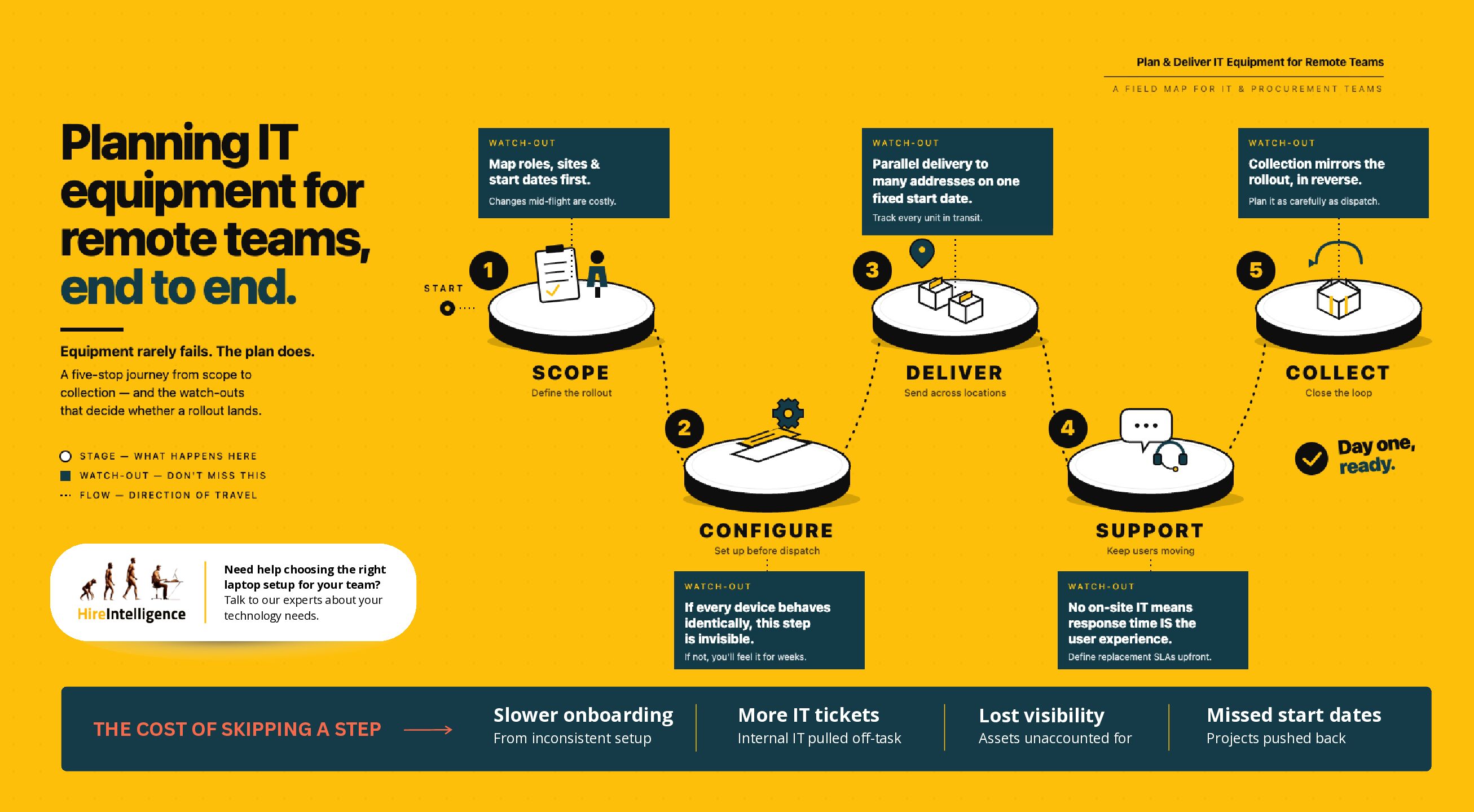
These challenges are rarely caused by the equipment itself. They tend to reflect how the deployment has been planned and managed. A structured approach reduces much of this complexity by bringing preparation, coordination and support together as part of a single process, rather than separate tasks handled in isolation.
In practice, this means defining how equipment moves from requirement to end user, and how it is supported throughout its lifecycle.
Scoping requirements
User roles, locations and timelines all shape what is required. A team onboarding at once places different demands on delivery and preparation than a phased rollout across multiple regions. Defining this early creates direction and reduces the need to adjust once equipment is already in motion, when changes are harder to manage.
Configuration and preparation
From there, attention shifts to how each system is set up before it leaves. This is where environments are aligned, software is installed, and access is structured to reflect internal requirements. When handled properly, users are not aware of this step at all; they simply receive equipment that behaves as expected.
Distribution to users
The moment equipment begins moving, the dynamic changes. Instead of a single delivery point, devices are sent across multiple locations, often at the same time, whether that is home offices or temporary project sites. Accuracy matters here, not just for timing, but for maintaining visibility over where each unit has gone.
Support during use
Once everything is in place, the focus shifts again. At this stage, continuity becomes the priority. Issues are not always avoidable, particularly across a distributed team, but the response to them determines the level of disruption. For remote users, where there is no immediate fallback, responsiveness becomes part of the overall reliability of the rollout.
End-of-hire collection
The final stage tends to receive less attention, but it completes the process. Equipment needs to be returned from multiple locations, packaged and labelled correctly, recorded accurately and accounted for without adding unnecessary work internally. In many ways, this mirrors the earlier distribution phase, just in reverse.

What should you ask before choosing a remote IT rental provider?
By this stage, the requirements are usually clear. The next step is understanding how a provider will handle the rollout in practice, not just what equipment they can supply. The most useful questions tend to follow the same stages as the deployment itself, but the value comes from how those questions are answered.
Delivery and logistics
For remote teams, delivery is often where early pressure appears. Equipment needs to reach multiple users, sometimes at the same time, and often against fixed start dates.
What matters here is not just whether delivery is possible, but how controlled the process is. A provider may be able to ship devices, but coordinating multiple deliveries in parallel is a different level of execution. It is worth understanding how timelines are managed and how progress is tracked once equipment is in transit.
Configuration and setup
Preparation has a direct impact on how users experience the rollout. If this stage is handled well, it is largely invisible. If it is not, the effects are felt immediately.
In practical terms, this usually comes down to:
- Whether systems are set up before dispatch
- Good engagement between IT teams and those preparing devices
- How a consistent environment is maintained across users
- How your internal requirements are applied
Where this is well managed, onboarding tends to be smooth. Where it is not, variation between users becomes a recurring issue.
Support and response
Once equipment is in use, attention shifts to how issues are handled. Not every problem can be avoided, particularly across distributed teams, but the response to them determines how disruptive they become.
Rather than a full checklist, it is often enough to clarify two things:
- How quickly support can be accessed
- What happens if a device needs to be replaced
The details behind those answers usually reveal how structured the support model is.
Flexibility and scale
Remote deployments rarely stay static. Teams change, projects evolve, and requirements shift over time.
Some providers build flexibility into the arrangement, while others operate within more fixed structures. It is worth understanding how easily volumes can be adjusted, whether hire periods can be extended or shortened, and how returns are handled across multiple locations.
Bringing it together
Individually, these questions are straightforward. Taken together, they give a clearer picture of how a provider operates across the full lifecycle.
The distinction is rarely in the equipment itself, but in how reliably each stage is handled, from preparation through to collection.
When should you rent instead of buy IT equipment for remote teams?
Once the deployment approach is clear, the next decision is whether renting or buying is the more practical fit.
For remote teams, this is less about ownership and more about how equipment is deployed, managed and adapted over time. Where devices are delivered across multiple locations, supported to a consistent standard and returned at the end of a project, the operating model becomes just as important as the hardware itself.
Renting vs buying: what is the difference in practice?
| Factor | Renting | Buying |
| Upfront cost | Lower initial outlay | Higher capital investment |
| Deployment speed | Devices prepared and delivered, ready to use | Procurement and internal setup required |
| Flexibility | Volumes and terms can be adjusted | Fixed once purchased |
| Setup and configuration | Completed before delivery | Managed internally |
| Support and maintenance | Hardware Support included as part of the service | Internal responsibility |
| Asset management | Coordinated throughout the rental period | Requires internal tracking |
| End-of-life | Equipment returned at the end of the hire | Disposal or repurposing required |
When does renting make more sense?
Renting is often the more practical option where equipment needs to be deployed quickly, across multiple locations, or for a defined period of time.
This typically applies to:
- Onboarding remote employees or contractors
- Short-term or project-based teams
- Training programmes delivered across different locations
- Temporary scaling where requirements may change
In these environments, the ability to deploy, manage and retrieve equipment in a controlled way tends to outweigh the benefits of ownership.
When is buying more suitable?
Buying is generally more appropriate where requirements are stable and long-term, and where internal teams are set up to manage configuration, support and asset tracking.
This is often the case for:
- Established teams with consistent device requirements
- Environments where equipment is retained over several years
- Organisations with in-house IT processes, workbenches, and pools of assets already in place

Plan and deliver your remote team rollout with confidence
Delivering IT equipment to remote teams requires more than selecting the right devices. It depends on how consistently each stage is managed, from preparation and configuration through to delivery, support and collection.
Hire Intelligence UK supports organisations in planning and delivering IT equipment for remote teams, ensuring deployments are consistent, well-structured and ready from day one.
If you are planning a rollout, get in touch to discuss your requirements. We’ll organise the right setup, confirm availability and ensure equipment is delivered ready for immediate use.
Frequently Asked Questions
Q. Can devices be configured to match our internal IT environment?
A. Yes. Devices can be prepared before dispatch to align with your internal environment, including operating system setup, software installation, user access and security policies. Hire Intelligence work with your IT experts to agree a defined image/configuration. That is then copied onto each device, with occassional updates as/when agreed with you. This ensures each user receives equipment that is ready to use and consistent with your organisation’s requirements.
Q. How is equipment tracked across multiple remote locations?
A. Each device is allocated to a specific user or location and tracked throughout the rental period. This maintains visibility across the deployment, supports internal reporting, accurate invoicing and ensures equipment remains accounted for as it is distributed and returned.
Q. Can rental agreements be adjusted as team requirements change?
A. Yes. Rental arrangements can be scaled in line with project needs, whether that involves adding devices, extending hire periods or reducing volumes as requirements change. This allows organisations to adapt without committing to fixed assets.
Q. How do we ensure every user has the same setup?
A. Consistency is achieved through standardised configuration before dispatch. Each device is prepared to the same specification, including software, access and security settings, so users receive a uniform environment regardless of location.
Q. How do we manage equipment for temporary or contract staff?
A. Equipment can be allocated to individual users for the duration of their role and then returned at the end of the hire period. This provides a clear structure for issuing, tracking and retrieving devices, particularly in environments where team composition changes regularly.